
Running a gun store means managing more than inventory, compliance, and customer service. It also means building a payment setup that works reliably at the counter, supports your business model, and does not create unnecessary friction for customers who are ready to buy.
That is why a payment processing setup checklist for gun stores matters. A rushed or incomplete setup can lead to delayed approvals, limited payment options, hardware problems, checkout issues, and even account instability later.
For firearms retailers, payment acceptance is rarely a plug-and-play decision. Many stores need a provider that understands the retail category, supports lawful firearm-related transactions, and can underwrite the account with a clear picture of how the business operates.
A general processor that looks fine on the surface may not always be the right fit if it does not support your product mix, sales channels, or long-term needs. The result can be avoidable disruptions that affect both revenue and customer trust.
This article walks through a practical, start-to-finish guide to gun store payment processing setup. You will learn what the core parts of a payment system actually do, what documents and underwriting details are usually needed, which features matter most, what costs to review before signing, and how to avoid common mistakes that slow down setup.
Whether you are opening a new storefront, upgrading your current systems, or adding online sales, this guide will help you build a firearm payment processing setup that is stable, secure, and aligned with how your store really operates.
Why Gun Stores Need a Payment Processing Setup Checklist

A payment processing setup checklist for gun stores helps turn a complicated decision into a manageable process. Many retailers start by focusing on rates alone, but pricing is only one piece of the picture.
For a gun shop, the real goal is to build a payment environment that can support day-to-day sales without interruptions, reduce approval delays, and match the store’s specific sales channels and product mix.
Gun stores often face closer review during onboarding than lower-risk retail categories. That does not automatically mean approval is difficult, but it does mean the provider will usually want a clearer understanding of what you sell, how you sell it, and how payments will be accepted.
A store that sells firearms in person may have different setup needs from an FFL dealer handling transfers, an ammunition seller with recurring repeat customers, or a multi-channel merchant offering both retail and online checkout. Without a checklist, it is easy to overlook details that matter to underwriting and long-term account performance.
A structured setup process also helps prevent expensive mistakes. Some businesses choose a provider before confirming gateway compatibility, POS support, chargeback tools, or contract terms.
Others buy equipment first and discover later that it will not work with the approved processor. In some cases, merchants launch an online checkout before ensuring the website meets underwriting expectations, which can delay approval or trigger follow-up questions.
A checklist keeps the process grounded in business realities. It helps you gather the right documents, define your needs clearly, compare providers on more than marketing promises, and launch with fewer surprises. It also gives store owners and managers a way to think beyond initial approval and toward long-term reliability.
Why standard retail payment assumptions do not always work
Many general retail payment guides assume a simple storefront model with standard card-present sales, minimal underwriting questions, and a basic terminal or POS. Gun stores do not always fit that pattern.
A firearms retailer may sell regulated products, accessories, safes, ammunition, training-related services, or special orders. Some operate mainly in-store, while others add phone orders, invoices, online accessory sales, or mobile checkout at events. Those differences shape the payment setup.
Standard retail assumptions also tend to blur the lines between the processor, the gateway, and the merchant account. For gun stores, those distinctions matter because one provider may support in-store sales but not certain online configurations, while another may support multiple channels but require extra underwriting documentation.
Stores that rely on a generic setup approach can end up with mismatched tools, duplicated costs, or a provider relationship that becomes fragile when the business grows.
Another issue is account stability. A retailer may get approved initially with incomplete disclosures, then run into trouble later when the processor sees a different product mix or higher volume than expected.
That is why a careful gun store merchant account setup is about accuracy, not just speed. The more clearly your business is presented during onboarding, the more likely you are to end up with a solution that fits.
How a checklist improves operations after approval
The value of a checklist does not end once the merchant account is approved. A strong setup process improves daily operations long after the paperwork is done.
It helps make sure employees know which devices to use, how different tender types are accepted, how refunds are handled, and what to do if a transaction fails. That reduces confusion at the counter and creates a more consistent customer experience.
It also helps with reporting and back-office management. When your payment processor, gateway, POS, and invoicing tools are selected with intention, you are more likely to get cleaner sales data, easier reconciliation, and better visibility into transaction patterns.
That matters when you are tracking sales by category, reviewing chargebacks, or evaluating busy periods and ticket sizes.
A checklist also supports better expansion planning. If you want to add e-commerce, curbside pickup, mobile payments, or a second location later, a well-planned setup makes those steps easier.
Instead of rebuilding from scratch, you can expand from a stable foundation. In that sense, secure payment processing for firearms businesses is not just about risk management. It is also about making the business easier to run every day.
The Core Components of a Payment Processing Setup
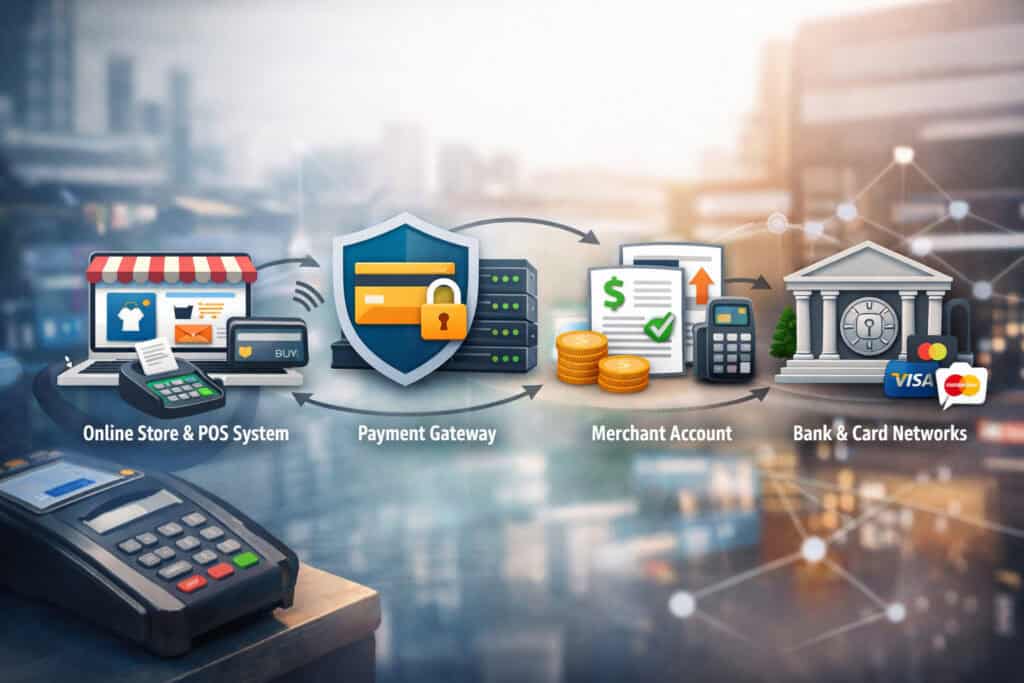
Before you can build the right setup, it helps to understand the major parts involved. Payment systems often sound more confusing than they really are because several tools work together behind the scenes.
For gun store payment processing setup, the key is knowing what each piece does and how those pieces connect.
A merchant account is the account that allows your business to accept card payments. It is not the same as your regular bank account.
Instead, it functions as the place where card transactions are authorized and held before funds are settled into your business bank account. Approval for this account often involves underwriting, especially for firearm-related merchants.
The payment processor is the company or platform that moves transaction data between your store, the card networks, and the issuing bank. When a customer inserts, taps, or enters a card, the processor helps route the payment for approval. In practical terms, the processor is a central part of how the transaction actually gets handled.
A payment gateway is typically used for online payments, virtual terminal activity, and sometimes invoicing. It securely transmits card information from your website or keyed-in interface to the processor. If your store sells online, takes deposits remotely, or sends invoices, the gateway becomes especially important.
A POS system is the software and hardware environment used to ring up sales, manage items, apply taxes, track inventory, and sometimes manage customer data. A POS can include a touchscreen, register software, barcode scanner, receipt printer, and connected payment device.
A card reader or terminal is the hardware customers use to pay. It may be a countertop terminal, PIN pad, wireless device, or integrated reader tied to the POS. EMV chip support, tap-to-pay, and receipt options are all part of this layer.
When these tools are selected carefully, they create a smoother experience for both staff and customers. When they are mismatched, checkout becomes slower, troubleshooting gets harder, and costs can rise.
Merchant account vs. payment processor vs. gateway
These terms are often used interchangeably in marketing, but they are not identical. For a gun shop merchant account setup, understanding the difference can save a lot of confusion later.
The merchant account is the approval-based relationship that allows your store to process card transactions. This is the piece that underwrites reviews.
During the application process, the provider may look at your business entity, ownership information, product mix, estimated volume, average ticket size, website presence, and prior processing history. If your store is approved, the merchant account becomes the foundation for accepting payments.
The payment processor handles the movement of transaction data and helps facilitate authorization and settlement. Some providers package merchant account services and processing together, which is why the distinction sometimes feels blurry.
Still, the processor is not the same thing as your business deposit account or your POS software. It is one part of the full chain.
The gateway is most relevant when payments are not simply being taken through a standalone card terminal. If you sell accessories online, accept deposits through your website, key in payments from a virtual terminal, or send digital invoices, the gateway is what securely carries the payment data into the processing environment.
Not every gateway is equally well suited to firearm-friendly payment processing, so compatibility and underwriting fit matter.
POS system, card readers, and checkout tools
A POS system is where payment acceptance meets retail operations. In a gun store, the POS often does much more than total up items.
It may help staff search inventory, manage serialized product records depending on operational workflows, handle accessories sales, print receipts, track employee activity, and connect customer transactions to reporting. That is why choosing a POS is not just a hardware decision. It is an operational decision.
Card readers and terminals are the physical tools customers interact with. These devices should support EMV chip cards and contactless payments at minimum.
Depending on the store layout, you may also need wireless devices for flexible checkout, customer-facing PIN pads, or backup terminals for busy periods. Credit card machines for gun stores should be durable, easy for staff to use, and supported by the processor without awkward workarounds.
Additional checkout tools may include a virtual terminal for keyed-in payments, invoicing software for remote billing, mobile card readers for off-site activity, and online checkout functionality if you sell eligible products through a website. For stores with multiple sales channels, integration matters a lot.
A strong system should help unify reporting and reduce the need to jump between disconnected platforms. That is especially valuable for payment solutions for firearms retailers that need reliable tracking and fewer operational gaps.
Payment Processing Setup Checklist for Gun Stores
A practical checklist can help you move from general research to a real implementation plan. The best payment processing setup checklist for gun stores is not a generic retail worksheet. It should reflect how firearm-related merchants are reviewed, how gun shops actually operate, and what matters at the counter, online, and behind the scenes.
Start by defining your business model. Clarify whether you sell only in-store, operate as an FFL dealer, run online checkout for accessories or approved product categories, process invoices, or need mobile acceptance.
Identify your expected monthly volume, average ticket size, and busiest transaction types. Providers need this information, and you need it too when comparing features and pricing.
Next, gather the documents and details needed for underwriting. That typically includes business formation records, tax identification details, ownership information, bank account information, and website details if applicable.
If you have processing history, prepare recent statements. If you are a startup, be ready to explain projected volume and product mix clearly.
Then evaluate the core tools. Decide whether you need a standalone terminal, a full POS, a gateway, invoicing, virtual terminal access, or mobile readers. Confirm which systems integrate cleanly.
Ask whether the provider supports your specific sales channels and whether any parts of your business require special review.
After that, review fees and terms carefully. Look beyond the headline rate. Ask about monthly costs, PCI-related fees, chargeback fees, equipment terms, gateway charges, minimums, reserves, and cancellation language. A good setup is not just affordable on paper. It is sustainable in real use.
Finally, plan the rollout. Install hardware, test every sales path, train staff, verify settlement timing, and make sure you know where to get support. A smooth launch depends on operational preparation, not just approval.
Step 1: Define your store’s sales channels and payment needs
The first step in firearm payment processing setup is being honest and specific about how your store actually sells. Too many merchants describe their business in broad terms during onboarding, then later add payment methods or channels that were not fully discussed.
That can create underwriting problems or feature gaps. A provider needs to know whether your business is card-present only, multi-channel, appointment-based, invoice-driven, or planning to expand.
Begin with the obvious questions. Do you sell only from a retail counter, or do you also take phone orders for eligible items, send invoices, or run an online store for accessories and related goods? Do you attend shows or events where mobile readers would help? Do you need one terminal or several? Will you have multiple users on the system? Are you replacing a current provider or launching for the first time? These answers shape the account setup, hardware plan, and software choices.
Then define the transaction profile. Estimate your monthly volume, average sale amount, highest expected ticket, and most common payment types. A store with high-value transactions may need stronger authorization workflows and clearer fraud controls.
A business with frequent accessory purchases may care more about fast checkout and repeat customer speed. This step is also where you decide whether you need a full POS system for gun shops or whether a simpler terminal-based setup is enough.
Step 2: Apply for the right merchant account and disclose accurately
A merchant account setup for gun stores should begin with full and accurate disclosure. That means clearly identifying your business type, ownership structure, products sold, expected sales channels, and any existing processing history.
The goal is not to make your business seem simpler than it is. The goal is to present it accurately so the account can be underwritten correctly from the start.
During the application process, the provider may ask for legal business documents, beneficial ownership information, bank details, and supporting information about your store. If you have a website, even a basic one, it should reflect your real business clearly.
If you have prior statements from another processor, those can help show actual volume and transaction behavior. If you are new, clear projections and a realistic explanation of your launch plan matter.
This is also the point where firearm-friendly payment processing becomes especially important. Not every processor is prepared to support firearm-related merchants with the same level of comfort or underwriting familiarity.
A provider that understands gun store payment processing setup is more likely to ask the right questions upfront and less likely to create mismatched expectations later.
Be especially careful with estimated volume and product mix. Understating those figures to speed approval can create bigger problems later. An account that is approved for one type of activity but used for another may face extra review. Stability starts with a clean setup.
Step 3: Choose the gateway, POS, and hardware that fit the store
Once approval is underway or complete, focus on the tools customers and employees will actually use. For a storefront, that usually means deciding whether you need a full POS or a simpler terminal setup.
If you manage inventory, want better reporting, or need a more modern checkout flow, a POS may be the better long-term choice. If your needs are minimal, a terminal-only configuration may be enough. The right answer depends on how your store operates.
If you sell online or plan to accept keyed-in payments, gateway selection matters. The payment gateway for firearms retailers should work with the approved merchant account and support the specific payment flows you need, such as hosted checkout, invoice links, or virtual terminal access. A weak gateway fit can create avoidable friction, even if the processing relationship itself is solid.
Hardware choices also deserve careful attention. Credit card processing for gun stores should support EMV, contactless payments, reliable connectivity, and easy staff use. Think through the counter layout, customer flow, internet stability, and whether you need backup devices.
If you operate in multiple rooms or across a large floor, wireless options may help. If you process high volumes on weekends, a second terminal can reduce delays. Good payment hardware is not just about features. It is about dependable, everyday use.
Step 4: Test every transaction path before going live
One of the most overlooked parts of a gun store payment processing setup is testing. Approval does not mean the system is ready. Before you go live, test every way your store expects to accept payments.
That includes chip transactions, tap payments, debit entry if applicable, refunds, voids, receipt printing, batch settlement, user permissions, invoicing, and virtual terminal transactions. If you sell online, test checkout from the customer side as well as the administrative side.
Testing helps uncover issues that are much easier to fix before launch than after customers are involved. For example, an integrated terminal might not sync properly with the POS, tax settings might be wrong, receipt formatting may be unclear, or settlement timing may not match expectations.
If you use multiple lanes or devices, each one should be tested individually. If you have multiple employees, let them practice common workflows.
This is also the time to verify reporting and deposit timing. Make sure you know when transactions batch, when funds are expected to settle, and where to view daily activity.
Payment processors for firearm businesses relationships are easier to manage when the operational basics are understood from day one. Testing is not wasted time. It is one of the simplest ways to reduce future friction.
Documents, Approval Requirements, and Underwriting Factors

Underwriting is one of the most important parts of firearm business payment setup requirements. While every provider has its own process, gun stores should expect a closer look than many standard retail businesses receive.
That does not mean approval is out of reach. It means preparation matters. A complete, accurate application gives the provider a clearer picture of your store and improves the odds of a smoother onboarding process.
At a basic level, most providers want to verify that the business is legitimate, properly formed, financially connected to a real operating bank account, and transparent about ownership. They also want to understand what the business sells, how payments will be accepted, and what transaction patterns are expected.
If you already process cards elsewhere, they may review your history to see chargeback patterns, monthly volume, and ticket size trends. If you are new, they may rely more heavily on projections and supporting documents.
Gun stores should also expect questions about sales channels. A physical storefront with in-person transactions may be reviewed differently from an online seller or multi-channel merchant.
If your store has a website, it should be current, professional, and consistent with what you told the provider. Missing business details, unclear policies, or a website that does not match the application can slow things down.
This stage is also where reserves or extra conditions may be discussed in some cases. Not every account will have them, but merchants should understand that reserve requirements can come up depending on risk profile, business history, or transaction characteristics.
The best way to handle underwriting is not to guess what the provider wants. It is to prepare the basics thoroughly and answer questions directly.
Common documents providers may request
The exact list varies by provider, but a gun shop merchant account setup usually begins with a core set of business and owner documents.
These may include formation records such as articles of organization or incorporation, an EIN confirmation or related tax documentation, a voided check or business bank letter, and a copy of a government-issued ID for each principal owner. If there are multiple owners, beneficial ownership details are often required as well.
Providers may also ask for recent business bank statements, prior processing statements, and supporting information about your store’s website or online presence. If you are already accepting cards, statements help the provider assess actual transaction patterns.
If you are new, they may ask for projected monthly processing volume, expected average ticket, highest ticket estimate, and a description of the products you sell.
A clear product mix is important for merchant account setup for gun stores because underwriting needs to understand whether the business is focused on firearms, ammunition, accessories, safes, training, or a blend.
If you operate online in any form, website requirements can matter. Your site should generally reflect your business identity, include contact information, and present your products or services accurately.
If you plan to use a virtual terminal or send invoices, explain that use case during onboarding rather than waiting until after approval.
What underwriters typically evaluate for gun stores
Underwriting usually focuses on predictability, transparency, and fit. For a firearm-related merchant, the provider wants to know that the business has been presented accurately and that the expected payment activity makes sense for the account being approved.
Underwriters often review ownership information, bank account consistency, estimated processing volume, ticket size, product mix, and sales channels together rather than in isolation.
One major factor is whether the expected transaction profile matches the business model. A small storefront with modest volume projections looks different from a larger dealer handling high-value transactions or online sales.
Product mix also matters. A store selling a broad range of regulated and non-regulated products may need to explain how those categories contribute to total volume. This is not about overcomplicating the application. It is about helping the provider understand the real business.
Prior processing history, when available, can influence the decision. Clean statements with stable volume and manageable chargebacks can support approval. Newer businesses may be asked for additional context because there is less history to review.
None of this means gun-friendly merchant services are impossible to find. It simply means that accuracy and preparedness are more important than rushing to submit an incomplete application.
Features and Tools Gun Stores Should Prioritize
The best payment setup is not just the one that gets approved. It is the one that helps your store run smoothly after approval. For that reason, stores should evaluate features based on how they affect checkout speed, risk management, reporting, customer experience, and long-term flexibility.
Secure payment processing for firearms businesses depends on more than the ability to run a card. It depends on whether the system supports your operation in real-world conditions.
EMV capability should be a baseline requirement. Contactless acceptance is equally important because customers increasingly expect tap-to-pay convenience.
A card reader that cannot support modern acceptance methods creates needless friction and may make checkout feel outdated. Reliable terminals, PIN pads, or integrated devices should also be easy for staff to learn and use.
Fraud tools matter as well, especially for keyed-in transactions, online payments, or higher-ticket orders. Virtual terminal controls, address verification, CVV verification, transaction filters, and user permission settings can all help reduce avoidable risk.
Chargeback support is another area worth reviewing carefully. Some providers offer strong visibility and workflow tools, while others leave merchants to sort through disputes with minimal guidance.
Reporting is often underestimated. Good reporting should help you reconcile batches, view transaction trends, identify refund activity, and monitor chargebacks without digging through confusing dashboards.
Integration compatibility is equally important. If your POS, gateway, terminals, and invoicing tools do not work well together, you may lose time every week to manual fixes and inconsistent data.
The right feature set depends on your store’s needs, but the core principle is simple: prioritize tools that improve reliability, visibility, and customer experience instead of chasing extra features you may never use.
Must-have payment features for in-store and online acceptance
For storefront operations, the must-have features begin with EMV, contactless payment support, and dependable hardware. Customers expect fast, familiar checkouts.
Staff need devices that connect consistently and work without complicated steps. Whether you use a standalone terminal or integrated POS, in-store payment acceptance should feel straightforward during busy periods, not just during a demo.
For stores with online or remote payment activity, gateway tools become more important. The payment gateway for firearms retailers should support secure checkout, tokenization where available, user access controls, and basic fraud safeguards.
If your business sends invoices, takes phone orders through a virtual terminal, or accepts deposits, these features become part of the day-to-day workflow. That makes usability just as important as raw functionality.
Other valuable tools include digital receipts, customer-facing confirmation screens, simple refund workflows, role-based permissions, and centralized reporting across sales channels. For multi-channel merchants, one of the biggest wins is visibility.
If the system allows you to review in-store, online, invoice, and manual transactions in a clean way, it becomes much easier to manage the business. Payment solutions for firearms retailers should support both compliance-minded operations and practical retail efficiency.
Nice-to-have tools that can improve efficiency
Not every useful tool is essential on day one, but some can make a big difference as your store grows. Mobile payment acceptance is a good example.
If you participate in events, need flexible counter setups, or want the option to take payments away from the main register, mobile readers can add convenience. They also help reduce bottlenecks during peak traffic periods.
Invoicing features can be valuable for special orders, deposits, or certain business-to-business transactions. Instead of taking card details verbally, your staff can send a secure invoice and let the customer pay through a controlled process.
Virtual terminal access is another useful option for stores that occasionally need to process keyed-in transactions without relying on separate systems.
Advanced reporting, multi-location support, saved customer profiles where appropriate, and integration with accounting or CRM tools can also improve operations. None of these automatically matter to every store.
The key is matching tools to actual workflows. Gun store payment processing setup should be practical, not overbuilt. The best extras are the ones your team will use regularly and that reduce friction instead of adding complexity.
Costs, Fees, and Contract Terms to Review Carefully
Cost matters, but focusing on a single advertised rate can lead stores in the wrong direction. A realistic evaluation of credit card processing for gun stores should include all the charges that affect your monthly total and the contract language that determines how flexible the relationship will be.
A provider with a lower headline rate may still cost more overall if the setup includes extra monthly fees, gateway costs, equipment charges, or restrictive terms.
Transaction pricing is the starting point. Stores should understand whether pricing is flat-rate, tiered, or interchange-based with a markup. Beyond that, ask about monthly account fees, PCI-related charges, statement fees, gateway fees, virtual terminal fees, and batch fees if applicable.
If you need a POS, confirm whether software licensing is billed monthly and whether hardware is purchased outright, financed, or leased.
Chargeback fees deserve close attention because they can add up quickly if disputes occur. Gateway charges matter too, especially for online or invoiced transactions.
Some providers also require reserves, such as rolling reserves, depending on the business profile. These are not universal, but they should be explained clearly if they apply. Stores should also ask whether there are monthly minimums or early cancellation fees.
Contract terms matter just as much as price. Find out how long the agreement runs, whether it renews automatically, how equipment agreements are structured, and what happens if your business needs change.
Transparent pricing and understandable contract language are part of trust. A good provider relationship should not depend on surprises hidden in the paperwork.
The most common processing costs gun stores should expect
Most gun stores should expect a mix of transaction-based and account-based costs. Transaction fees usually include a percentage of the sale plus a fixed per-transaction amount, though the structure varies by provider.
Card-present transactions may price differently from keyed-in or online transactions, so it is important to understand how each sales channel is billed.
Monthly costs can include account fees, gateway fees, virtual terminal fees, POS software subscriptions, PCI program-related charges, and reporting or support fees depending on the setup.
Equipment costs may be one-time purchases or recurring charges if devices are financed or leased. Credit card machines for gun stores should be reviewed as part of the total cost of ownership, not just the upfront price.
Other potential costs include chargeback fees, retrieval request fees, monthly minimums, and reserve requirements in certain cases. Rolling reserves, when used, typically mean a percentage of processing volume is temporarily held back for a defined period.
Not every firearm business payment setup will include them, but merchants should ask directly. Transparent payment solutions for firearms retailers should make these items understandable before the contract is signed, not after the first statement arrives.
How to compare pricing without oversimplifying the decision
Comparing pricing is not just about asking who has the lowest rate. A better approach is to compare providers against your actual transaction profile.
A store with high average tickets, mostly card-present sales, and low manual entry may have different cost priorities than a merchant using a gateway, invoicing tools, and multiple terminals. The right comparison starts with your business data.
Ask each provider to explain pricing in the context of your expected monthly volume, average ticket, and sales channels. Review both recurring and conditional costs. One processor may seem inexpensive until gateway fees and POS costs are added.
Another may look slightly higher but include better reporting, stronger support, and fewer surprise line items. Gun-friendly merchant services should be evaluated for fit and stability, not just rate marketing.
It also helps to review sample statements if available. A clean, understandable statement is a good sign. Complicated pricing structures are not always bad, but they should be explainable.
When a provider cannot clearly tell you how costs work, that is often a warning sign. Reliable firearm-friendly payment processing is built on clarity as much as cost.
Common Setup Mistakes and How to Avoid Them
Many payment setup problems are preventable. They often happen not because the store made a reckless choice, but because it moved too quickly, assumed tools would work together, or focused too narrowly on one factor like approval speed or rate.
A payment processing setup checklist for gun stores helps reduce those errors, but it also helps to know which mistakes appear most often.
One common mistake is incomplete disclosure during onboarding. A store may describe itself too generally, leave out an important sales channel, or fail to explain its actual product mix.
That can lead to extra underwriting review later or an account setup that does not fully fit the business. Another mistake is choosing hardware before confirming processor and POS compatibility. A terminal that looks modern and affordable is not useful if it will not integrate properly.
Some stores also underestimate the importance of website readiness. Even if online sales are not the main revenue source, a weak or inconsistent website can create questions during application review.
Others fail to test workflows before launch and end up troubleshooting refund settings, batch timing, or device behavior in front of customers.
Pricing mistakes are common too. Merchants sometimes compare only transaction fees while ignoring contract terms, gateway costs, software licensing, support quality, or equipment commitments. A setup that looks cheap at the start may become expensive or difficult to leave later.
The good news is that these mistakes are avoidable when the business takes a methodical approach. Clear documentation, accurate disclosure, system testing, and thoughtful comparison usually solve most of the problems before they become operational headaches.
Mistakes that delay approval or create account problems
The fastest way to create approval delays is to submit an incomplete or inconsistent application. Missing ownership information, weak business documentation, unclear projected volume, or a website that does not match the application can all trigger follow-up questions.
These are not unusual requests, but each additional round of clarification slows the process. A smooth gun shop merchant account setup depends on having documents ready and presenting the business consistently across all touchpoints.
Another issue is failing to describe the business model clearly. For example, a merchant may emphasize retail counter sales but overlook the fact that it also plans to send invoices, use a virtual terminal, or add online accessory sales.
Those details matter because they affect risk review and system design. If the approved setup later looks different from the actual transaction behavior, the processor may ask additional questions.
Overpromising on projections can also create trouble. It is better to give realistic monthly volume and average ticket expectations than to present numbers that sound polished but do not match real activity.
The goal of firearm payment processing setup is stable approval, not just quick approval. Accuracy helps providers support the account more effectively over time.
Mistakes that hurt customer checkout and staff efficiency
Some setup choices may not affect approval at all, but they can still create daily frustration once the store goes live. One of the biggest mistakes is selecting payment tools without thinking through the customer experience.
If your checkout requires too many screens, slow device responses, or awkward handoffs between staff and customer, every sale becomes harder than it needs to be.
Another common issue is poor integration. A POS that does not sync cleanly with the card reader can create duplicate entry, reconciliation headaches, and more opportunities for errors.
Stores may also overlook staff training, assuming the system is intuitive enough to learn on the fly. In reality, even a good system benefits from simple training on common tasks like voids, refunds, split payments, and end-of-day settlement.
Backup planning matters too. If a terminal loses connection or a device fails, staff should know what to do next. Secure payment processing for firearms businesses includes operational resilience, not just fraud prevention.
A store that can keep checkout moving during small technical problems will protect both revenue and customer confidence.
Best Practices for Building a Reliable Payment Workflow
A reliable payment workflow is the result of smart setup choices plus consistent daily habits. Once your store is approved and the system is live, the next goal is to make payment acceptance dependable, efficient, and easy to manage.
For gun store payment processing setup, reliability matters because payment issues do more than slow checkout. They can affect trust, staff confidence, reconciliation, and long-term account health.
Start with consistency. Decide how transactions should be handled at the counter, through the virtual terminal, by invoice, and online if applicable. Standardizing those workflows helps reduce errors and gives employees a clear path to follow.
It also makes it easier to review issues later because the process is predictable. For example, staff should know when to key a transaction, when to send an invoice instead, and when manager approval is needed for certain tasks.
Regular reconciliation is another best practice. Check batches, deposits, refunds, and failed transactions consistently so small issues do not go unnoticed.
Review statements and reporting at least monthly to spot unexpected fees, chargeback activity, or trends in card acceptance. Reporting is not just a bookkeeping task. It is how you monitor whether the payment setup is actually performing the way you expected.
Communication with your provider matters too. If your business adds a new sales channel, increases volume significantly, or changes its product focus, keep the processor informed. A stable account relationship often depends on avoiding surprises.
Payment solutions for firearms retailers work best when they are built on transparency, accurate expectations, and systems that match real operations.
Workflow best practices for brick-and-mortar and FFL-focused stores
For brick-and-mortar retailers, checkout flow should be simple, repeatable, and fast. That means terminals placed where customers can use them comfortably, staff trained on common payment scenarios, and clear procedures for refunds, voids, and receipt handling.
If your store uses multiple lanes or workstations, keep the process as similar as possible across each one. Consistency reduces employee confusion and makes service feel more polished.
FFL-focused operations may also need more deliberate workflows around deposits, transfers, or specialized order handling, depending on how the business is structured.
In these environments, a virtual terminal or invoicing tool can be useful, but the store should define exactly when those tools are used and by whom. Clear user permissions help reduce mistakes and improve accountability.
It is also wise to review hardware placement and network stability. A strong POS system for gun shops is only helpful if the terminals stay connected and the staff know how to troubleshoot basic issues.
Simple printed procedures for device restarts, batch checks, and support contacts can save time during busy periods. Reliable merchant account setup for gun stores is not just about approval. It is about daily execution that holds up under real store traffic.
Workflow best practices for online, accessory, and multi-channel sellers
Stores that sell across more than one channel need a more connected workflow. If you have a website for accessories, training, or approved remote transactions, your gateway, reporting, and back-office processes should line up with what happens in-store.
It helps to centralize visibility wherever possible so you can review online orders, invoice payments, and retail transactions without jumping between disconnected systems.
For online sellers, checkout flow deserves close attention. The process should be secure, easy to understand, and free of unnecessary friction.
Customers should know where they are in the checkout process, what payment methods are accepted, and how to contact the business if there is an issue. Payment gateway for firearms retailers decisions matter here because a clumsy or unreliable online payment flow can cost sales even when demand is strong.
Multi-channel merchants should also define who manages chargebacks, refund requests, gateway settings, and invoice workflows. These responsibilities often become blurry when the business grows.
Creating clear ownership helps keep the system organized. Credit card processing for gun stores works best when every channel is supported by a deliberate process, not just a collection of tools.
Frequently Asked Questions
Q.1: What does a payment processing setup checklist for gun stores include?
Answer: A payment processing setup checklist for gun stores usually includes business planning, merchant account application steps, document preparation, underwriting readiness, POS and hardware selection, gateway setup, testing, staff training, and contract review.
It should also include practical details such as estimating monthly volume, defining average ticket size, identifying sales channels, and confirming what products the store sells. The purpose of the checklist is to make sure the payment system fits the business before it goes live, not after problems appear.
A strong checklist also covers operational items like refund procedures, deposit timing, reporting access, and support contacts. It is both an approval guide and a launch guide.
Q.2: Why do gun stores often need firearm-friendly payment processing?
Answer: Gun stores often need firearm-friendly payment processing because not every provider handles firearm-related merchants the same way. Some processors are more familiar with the underwriting requirements, business models, and operational needs involved. Others may not be a good fit, even if they seem attractive at first glance.
Working with a provider that understands firearm business payment setup requirements can make approval more straightforward and reduce the chance of mismatched expectations later. The goal is a stable, transparent setup that supports the lawful business model being presented.
Q.3: What documents are usually needed for a gun shop merchant account setup?
Answer: Most providers ask for standard business and ownership documents. These may include formation documents, tax identification details, business bank account information, owner identification, and beneficial ownership information. If the store already processes cards, recent statements may also be requested.
Depending on the setup, the provider may also ask about website details, expected monthly volume, average ticket size, product mix, and sales channels. Having these items organized in advance can speed up underwriting and reduce back-and-forth requests.
Q.4: What is the difference between a merchant account, gateway, POS, and card reader?
Answer: A merchant account is the account relationship that allows your business to accept card payments. The payment processor handles transaction routing and authorization.
A payment gateway securely transmits payment data for online, invoiced, or keyed-in transactions. A POS system manages the retail checkout environment, including sales, item entry, reporting, and often inventory functions.
A card reader or terminal is the physical device customers use to pay. These tools work together, but each serves a different purpose. Understanding the difference helps stores choose a setup that fits how they sell.
Q.5: Can a gun store use the same setup for in-store and online payments?
Answer: Sometimes yes, but not always in a simple way. Many stores can use one processing relationship across multiple channels, but the exact tools may differ.
In-store payments usually rely on terminals or POS-integrated readers, while online payments need a compatible gateway and checkout environment. Virtual terminal and invoicing tools may also be separate modules.
The key is compatibility and proper disclosure. If the store expects to sell across channels, that plan should be discussed during setup so the provider can recommend the right configuration.
Q.6: What fees should gun stores look at besides the transaction rate?
Answer: Gun stores should review monthly fees, gateway charges, POS software costs, virtual terminal fees, equipment costs, chargeback fees, PCI-related fees, and any reserve requirements if they apply. Contract terms also matter, including cancellation language, equipment agreements, and renewal provisions.
Looking only at the transaction rate can be misleading. The better approach is to review the full cost structure based on how the store actually accepts payments.
Q.7: How can a store avoid payment setup delays?
Answer: The best way to avoid delays is to prepare thoroughly before applying. Gather business documents, bank details, ownership information, and any prior processing statements.
Make sure your website or public-facing business information matches what you are presenting in the application. Be clear about product mix, sales channels, and expected volume.
It also helps to ask direct questions early about underwriting expectations, integration compatibility, and support. A realistic, accurate application is usually the fastest path to a stable setup.
Conclusion
The right payment processing setup is not just a technical requirement for a gun store. It is part of how the business earns trust, serves customers efficiently, and protects revenue from avoidable disruptions.
A strong payment processing setup checklist for gun stores helps owners and managers move through the process with more clarity, from merchant account approval and underwriting preparation to hardware selection, gateway decisions, and everyday workflow planning.
The most effective setups are built on accuracy and fit. That means understanding your real sales channels, being transparent during the application process, choosing tools that work together, and reviewing fees and contract terms with care.
It also means thinking beyond approval. A good setup should support smooth checkout, clean reporting, reliable settlement, and enough flexibility to grow with the business.
Whether you run a brick-and-mortar store, operate as an FFL dealer, sell accessories online, or manage multiple sales channels, the core principles stay the same.
Choose firearm-friendly payment processing that aligns with your business model, gather your documentation early, test thoroughly before launch, and treat payment workflows as a core part of store operations.
When done well, your payment setup becomes more than a utility. It becomes a stable foundation for a better customer experience and a more dependable retail operation.